Check RTX 4060 Laptop TGP Benchmarks Before Buying
The GeForce RTX 4060 Laptop GPU is not one fixed product in the field. NVIDIA defines it across a 35W to 115W Total Graphics Power range, and notebook vendors choose where their chassis lands.
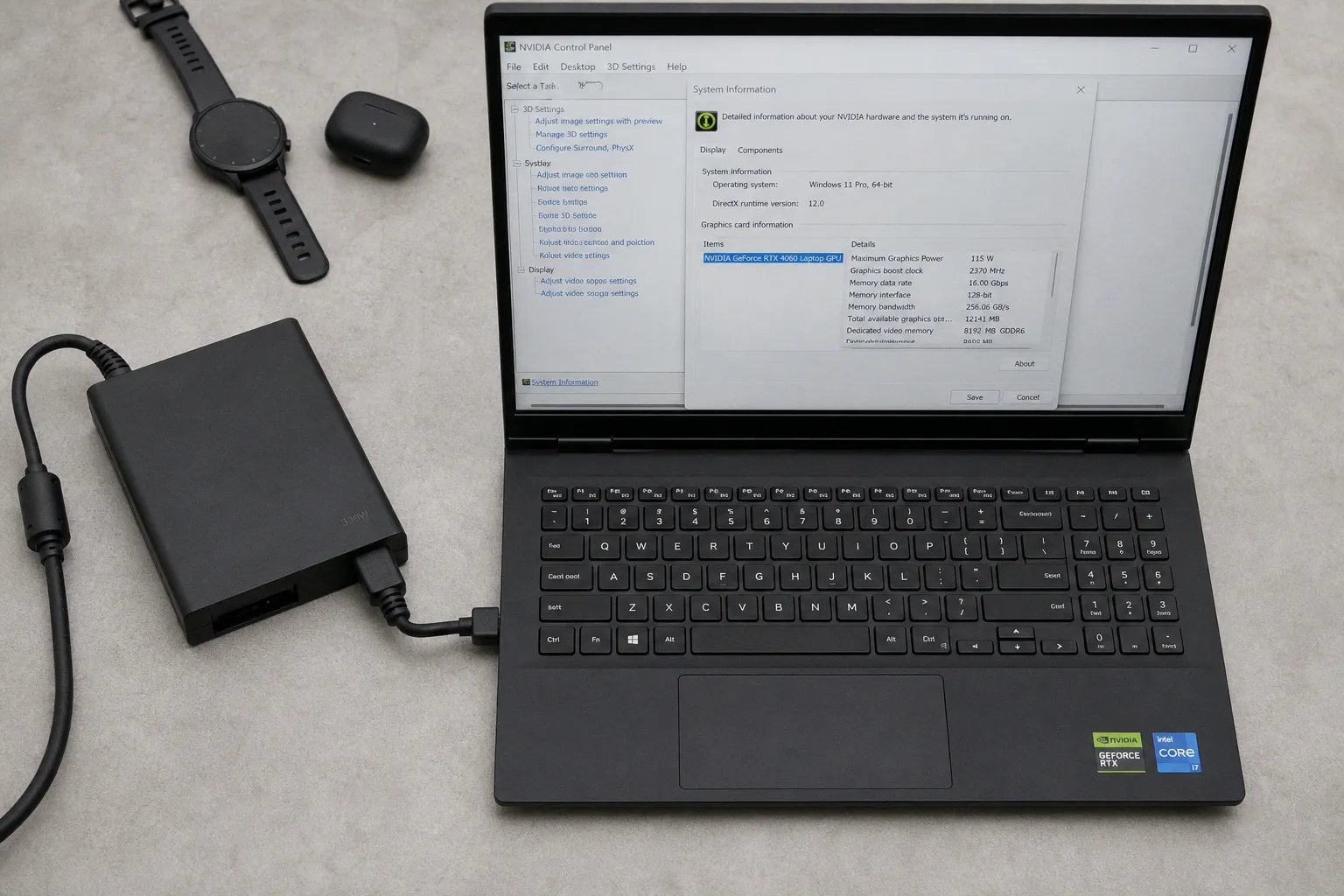
That single firmware and cooling decision can create a 20–30% performance gap between two laptops that both carry the same RTX 4060 badge.
That is the reason to check RTX 4060 laptop TGP benchmarks before buying. The model name is insufficient. The GPU name tells you the silicon class. The TGP tells you the operating envelope. In this tier, the wattage limit often predicts sustained frame rate more accurately than the marketing name on the lid.
The TGP Trap: Identical GPU Name, Different Output
The RTX 4060 Laptop GPU launched as part of NVIDIA’s 2023 mobile RTX 40-series stack. On paper, it sits in a clean product ladder. In actual laptops, it fragments. A thin 14-inch machine may run the RTX 4060 at a low graphics power target. A thicker 15- or 16-inch gaming chassis may run the same GPU much closer to the top of NVIDIA’s allowed range.
For related context, see TV guides, broadcasting and streaming: what to watch, streaming guides, TV schedules,.
Both can be sold as “RTX 4060 laptops.” They are not equivalent machines.
The main variable is Total Graphics Power, or TGP. This is the power budget assigned to the GPU. It sets the ceiling for GPU clocks under load, assuming the cooling system can hold temperatures below throttling thresholds. It also interacts with CPU power allocation, fan curves, chassis volume, VRM capability, and firmware limits.
A low-watt RTX 4060 is not defective. It is a different implementation. It usually targets lower noise, lower chassis mass, and lower adapter size. A high-watt RTX 4060 targets higher sustained GPU throughput. The problem is that retail listings often compress those differences into one GPU label.
The RTX 4060 badge is a silicon identifier. It is not a performance guarantee.
For a buyer comparing laptops, the relevant question is not only “Does it have an RTX 4060?” The correct question is narrower: what is the Maximum Graphics Power, and can the thermal system sustain it without thermal throttling?
This matters in benchmarks. A 45W configuration and a 100W-plus configuration may separate clearly in GPU-bound games and synthetic graphics tests. The difference is not theoretical. It is the normal result of NVIDIA’s configurable mobile power model.
Decoding the 35W to 115W Power Spectrum
NVIDIA’s official configurable range for the RTX 4060 Laptop GPU runs from 35W to 115W. That range can include Dynamic Boost, depending on the manufacturer’s implementation and the system’s current CPU load.
The lower end exists for compact laptops. The upper end exists for performance-oriented gaming systems with more cooling capacity. The midpoint is common in thinner gaming notebooks where vendors balance acoustics, temperature, and chassis thickness.
A simplified map is useful, with one caveat: exact FPS depends on the laptop, CPU, memory configuration, display resolution, game engine, driver version, and cooling behavior.
| RTX 4060 Laptop TGP class | Typical laptop profile | Expected behavior | Main limitation |
|---|---|---|---|
| 35W–45W | Thin-and-light gaming or creator chassis | Lower sustained clocks; larger gap from full-power units | Power limit appears quickly in GPU-heavy loads |
| 60W–80W | Slim gaming notebooks | Balanced GPU output; often adequate for 1080p high settings | Shared thermal budget with CPU can reduce stability |
| 90W–100W | Standard gaming chassis | Strong scaling versus low-watt models | Cooling design begins to matter more than label |
| 105W–115W | Higher-power gaming chassis | Near the top of practical RTX 4060 Laptop output | Gains versus 100W are often marginal |
The data pattern is consistent: scaling is meaningful from 45W to around 100W. After that, returns compress. The jump from a low-watt 45W unit to a 100W-class unit can produce a visible FPS gain. The jump from 100W to 115W is frequently smaller in real games.
This is why the top number alone is not a complete benchmark proxy. A 115W listing looks clean on a spec sheet. But if the cooling system cannot remove the heat, the GPU may drop clocks under sustained load. That converts advertised headroom into intermittent boost behavior.
A proper comparison separates three numbers:
1. Configured Maximum Graphics Power. This is the manufacturer-set GPU limit, visible in NVIDIA software or vendor documentation.
2. Sustained board power under load. This is the power the GPU actually holds during a long benchmark loop.
3. Sustained clock behavior. This reveals whether the GPU is power-limited, thermally limited, or constrained by shared platform power.
A short benchmark run can hide weak cooling. A 10-minute or 20-minute loop is more useful. If the first run is strong and later runs fall, the laptop is not sustaining its advertised configuration. That is not an RTX 4060 issue. It is a chassis and firmware issue.
Dynamic Boost: The Shared Budget Behind the Label
Dynamic Boost complicates RTX 4060 laptop comparisons. The feature allows the GPU to draw additional power from the CPU power budget when workload conditions permit. In many designs, this extra allowance is in the 15W to 25W range. It is included in the maximum TGP figure rather than added separately as a permanent guarantee.
This distinction matters. A laptop advertised with a high maximum graphics power may reach that number only when the CPU is not heavily loaded. In a GPU-bound scene, that can work. In a game that stresses both CPU and GPU, the platform has to divide power between the two processors.
The result is workload-dependent behavior.
A GPU-heavy title at 1080p or 1440p may let Dynamic Boost favor the RTX 4060. A CPU-heavy multiplayer game may keep more power on the processor. A creator workload can vary by application: CUDA rendering, timeline playback, export, and AI-assisted effects do not stress the system in identical ways.
That is why comparing only peak GPU wattage is incomplete. The better test is combined load.
Look for benchmark runs that include:
- Long gaming loops, not single-pass numbers. The relevant metric is sustained FPS after heat saturation.
- CPU telemetry alongside GPU telemetry. A GPU running high while the CPU collapses can distort frame pacing.
- 1% low frame rates. Average FPS can remain acceptable while frame-time consistency degrades.
- Surface and internal temperature readings. High GPU wattage has no value if the laptop throttles or runs fans at an intolerable profile.
- Adapter wattage and battery discharge behavior. Some laptops can draw near the adapter limit under combined load.
This is where retail comparison becomes work. The RTX 4060 Laptop GPU is a configurable component inside a power-managed platform. It is not a discrete desktop card with a fixed board power and wide cooler compatibility.
For buyers who handle procurement, resale pages, or online storefronts, the same discipline used in digital commerce performance tracking applies here: the label is a starting field, not the decision variable. The usable data sits in the secondary specifications.
How to Verify Maximum Graphics Power Before Purchase
The fastest verification path is the NVIDIA Control Panel. On a laptop already in hand, open NVIDIA Control Panel, select Help, then System Information, and locate Maximum Graphics Power. That field reports the configured GPU power limit for the installed system.
That is the cleanest post-purchase method. Before purchase, the process is less direct but still manageable.
Step 1: Check the manufacturer specification page
Manufacturers are required to list TGP and clock speeds in their technical specifications or Max-Q documentation on product pages. Do not rely on the retailer headline. Retail pages often mention “RTX 4060 8GB” and omit the actual power limit.
The manufacturer page is the primary source. Search within the technical sheet for:
- Maximum Graphics Power
- TGP
- GPU power
- Max-Q
- Dynamic Boost
- Graphics clock
- Boost clock
If the page lists only the GPU name and memory size, the listing is incomplete for performance comparison.
Step 2: Confirm the exact SKU
Laptop names are imprecise. One product family may include several chassis configurations with different CPUs, displays, memory, storage, and GPU power limits. A review of one SKU may not apply to another SKU sold through a different retailer.
Check the full model code. Then match that code to the vendor specification sheet. This is especially relevant for regional variants. A laptop sold in one market can carry a different panel, adapter, or firmware configuration from a unit reviewed elsewhere.
Step 3: Use NVIDIA Control Panel after delivery
Once the laptop arrives, confirm the field directly.
The path is:
1. Right-click the desktop and open NVIDIA Control Panel.
2. Select Help in the menu bar.
3. Open System Information.
4. Find the RTX 4060 entry.
5. Read Maximum Graphics Power.
That value is the number to compare against the advertised specification.
Step 4: Run a sustained test, not a launch test
Maximum Graphics Power is the configuration limit. It is not proof of sustained performance. The laptop still has to cool the GPU.
A basic validation run should include one GPU-heavy benchmark loop or a repeatable game benchmark for at least several passes. Watch GPU power, temperature, clock speed, and FPS consistency. If power starts high and then settles materially lower, the chassis is thermal-limited or firmware-limited under sustained load.
This is the difference between specification compliance and usable performance. The first is a listing issue. The second is an engineering issue.
A 115W configuration that throttles is not automatically better than a 100W configuration that holds clocks.
Benchmarks: What the Data Usually Shows
The RTX 4060 Laptop GPU does not scale linearly across the whole 35W to 115W range. That is normal. GPU voltage-frequency behavior becomes less efficient as power rises. At lower wattage, each additional watt can produce a meaningful clock gain. Near the upper envelope, additional wattage produces smaller real-world movement.
The practical curve has three regions.
Low-watt region: 35W to 45W
This region is constrained. It can still be useful in compact laptops, but it should not be benchmarked against high-power gaming systems without adjustment. The GPU hits the power ceiling early. Frame rates in GPU-bound workloads trail higher-TGP versions by a visible margin.
This class is often paired with thinner chassis. The system goal is portability and controlled thermals, not maximum RTX 4060 output. The buyer should treat it as a separate performance category.
Midrange region: 60W to 80W
This is the compromise zone. It can deliver competent 1080p gaming performance when the cooling system is adequate. It also reduces the thermal burden compared with 100W-plus designs.
The main risk is mixed-load behavior. If CPU and GPU share a tight platform budget, Dynamic Boost may not consistently favor the GPU. That can affect CPU-heavy games and background workloads. Frame pacing should be checked, not only average FPS.
High-watt region: 90W to 115W
This region captures most of the available RTX 4060 Laptop performance. The jump from 45W to this class is significant. The jump inside this class is smaller.
A 100W-class RTX 4060 can be close to the practical ceiling in many games. The extra 15W to reach 115W may help in some workloads, but it is not a universal separator. Cooling quality, fan profile, CPU behavior, and memory configuration can erase or reduce the difference.
This is where buyers often over-index on the largest number. The better comparison is 100W sustained versus 115W advertised. Sustained power wins.
Why Retail Specs Miss the Actual Performance Question
Retail specifications still emphasize GPU name, VRAM amount, CPU generation, RAM size, and storage capacity. Those fields are easy to list. They are not enough for RTX 4060 laptop performance.
VRAM is a useful example. Most RTX 4060 laptop listings will show the memory amount clearly. That does not tell the buyer whether the GPU is power-limited to 45W or allowed to run above 100W. Two laptops can have the same VRAM and different performance behavior.
The same applies to display resolution. A 1440p panel with a low-watt RTX 4060 may create a mismatch in newer games. A 1080p panel with a higher-watt RTX 4060 may deliver more stable output at high settings. The panel and GPU power target should be evaluated together.
A practical comparison grid should include the power and cooling fields, not only the retail headline.
| Purchase variable | Why it matters for RTX 4060 laptops | What to verify |
|---|---|---|
| Maximum Graphics Power | Defines the configured GPU power ceiling | NVIDIA Control Panel or manufacturer spec |
| Dynamic Boost behavior | Determines whether extra GPU wattage depends on CPU load | Vendor documentation and combined-load reviews |
| Chassis cooling | Controls sustained clocks and thermal throttling | Long benchmark loops and temperature data |
| CPU pairing | Affects shared power budget and frame pacing | CPU power behavior during games |
| Display resolution | Sets the GPU workload target | 1080p versus 1440p performance data |
| Adapter wattage | Limits total platform draw in some designs | Included power brick rating and stress behavior |
This is not a call to reject low-TGP laptops. It is a call to price them correctly. A 45W RTX 4060 laptop may be reasonable if it is thin, quiet, discounted, and paired with the right display. It should not be priced like a high-power gaming chassis if performance is the stated priority.
Thermal Throttling: The Number Behind the Number
A high TGP rating increases heat density. The laptop must dissipate it. If it cannot, the GPU lowers clocks to protect the silicon and stay within firmware targets. That behavior is thermal throttling.
The RTX 4060 power range makes this visible. At 35W to 45W, the cooling challenge is lower, but the performance ceiling is limited. At 100W to 115W, the performance ceiling is higher, but the cooling system has less margin. Heat pipes, vapor chambers, fan diameter, fin density, chassis venting, and firmware curves all affect the result.
This is why two 115W listings can differ. One may hold near its target through a long gaming session. Another may peak high, then settle lower after the chassis saturates. The specification remains technically true, but the user receives lower sustained throughput.
Useful review data should show:
1. Initial benchmark score. Indicates boost behavior from a cool start.
2. Looped benchmark score. Shows performance after heat saturation.
3. GPU power over time. Confirms whether the laptop holds its configured envelope.
4. GPU temperature over time. Identifies thermal constraints.
5. Clock speed over time. Reveals whether power or temperature is limiting performance.
6. Fan noise level. High sustained wattage often requires aggressive acoustics.
Without those fields, a benchmark table is incomplete. Average FPS alone can hide throttling. A laptop can post a good initial number and degrade after several minutes.
The Diminishing Returns Above 100W
The upper RTX 4060 Laptop range is not useless. It is just subject to diminishing returns. The difference between 45W and 100W-plus can be substantial. The difference between 100W and 115W is often marginal in real-world gaming.
This behavior follows the normal efficiency curve of modern mobile GPUs. As voltage and clock rise, each incremental watt produces less additional performance. At the same time, heat output rises and fan demand increases. The engineering trade becomes less favorable.
For purchase decisions, that means a buyer should not automatically reject a 100W configuration in favor of a 115W configuration. If the 100W laptop has stronger cooling, better sustained clocks, a better display, or lower noise, it may be the more rational machine.
The benchmark target should be sustained FPS per watt and sustained FPS per dollar, not maximum advertised TGP.
There is also a CPU factor. If a high-watt RTX 4060 configuration reduces CPU headroom under combined load, some games may not benefit as expected. That is especially relevant in titles with high simulation load or heavy draw-call pressure. In those cases, the GPU power ceiling is only one part of the frame-time equation.
What to Buy and What to Skip
The clean buying rule is binary.
Buy an RTX 4060 laptop if the manufacturer discloses the Maximum Graphics Power, the number fits the chassis class, and independent benchmarks show sustained performance without severe thermal throttling. A 90W to 100W-class implementation can be a rational target. It often captures most of the performance available from this GPU without relying on the last few watts of headroom.
Skip or discount heavily any RTX 4060 laptop listing that hides TGP, provides no maximum graphics power value, and has no reliable sustained benchmark data. The risk is not that the machine is unusable. The risk is paying high-power RTX 4060 money for a low-power RTX 4060 implementation.
The data shows the purchase variable clearly. The RTX 4060 Laptop GPU spans 35W to 115W. Dynamic Boost can add 15W to 25W depending on the design. Performance can vary by up to 20–30% between low-watt and high-watt variants. Scaling improves materially from 45W to 100W-plus, then compresses.
The verdict is direct: check the TGP before buying. If the seller does not disclose it, the listing is incomplete. If the laptop cannot sustain it, the number is cosmetic. Buy the implementation, not the badge.